
Variables & secrets
Variables let you pass data into a scenario at run time and carry data between blocks during execution. This page covers how to define variables, how to use them in blocks, and what to consider when a variable holds a sensitive value such as a password or API key.
What variables are
A variable is a named slot that holds a value during scenario execution. Variables come from two sources:
- Input variables — defined in the scenario's Variables panel; their values are supplied when you start a run.
- Runtime variables — created during execution by Extract, Script, API, and Loop blocks, which write their output into a named variable.
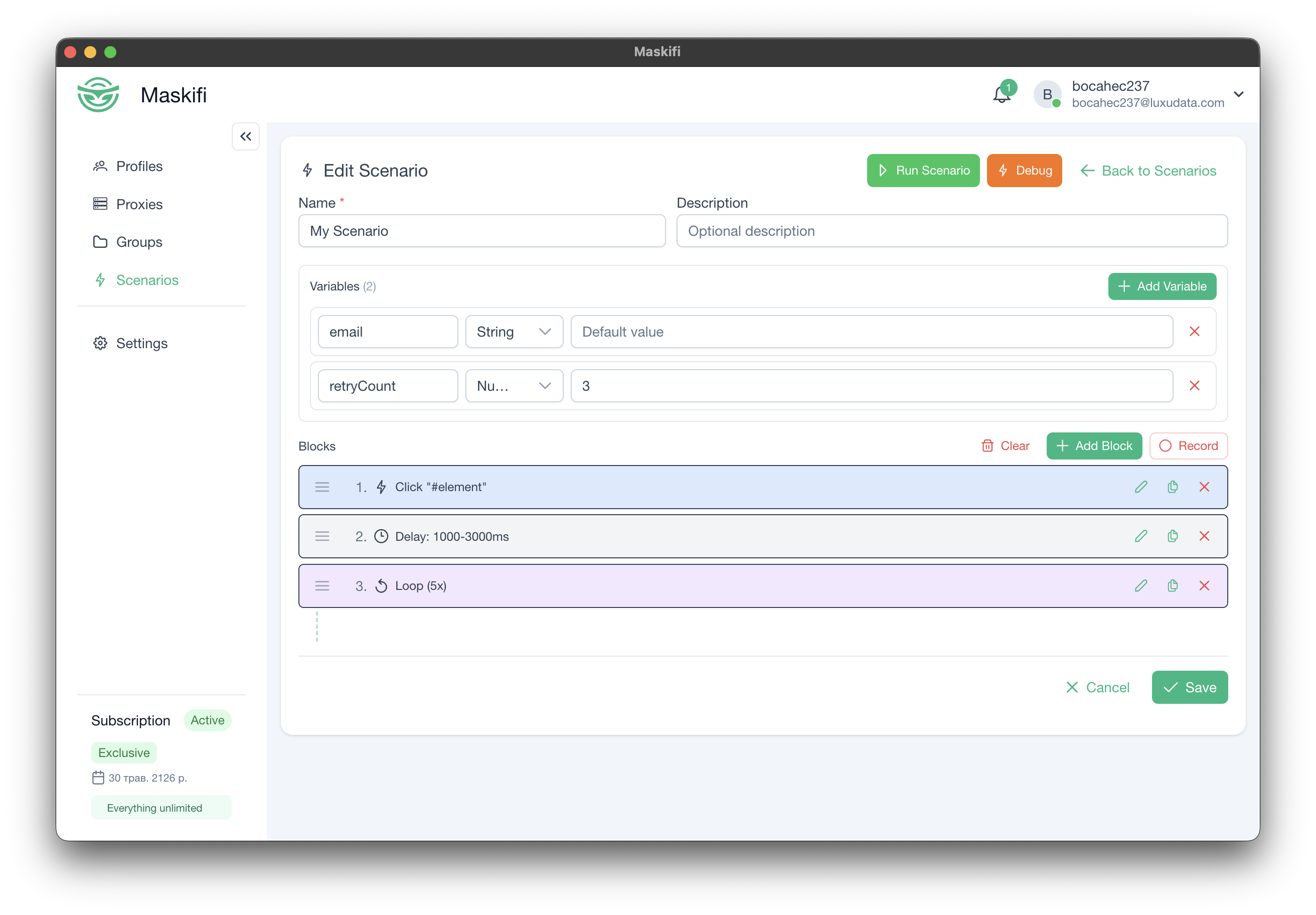
Defining input variables
Open the Variables panel in the scenario editor. For each variable, set:
| Field | Description |
|---|---|
| Name | The name used in {{variableName}} interpolation. Use simple letters and numbers (e.g. email, password, userId). |
| Type | Text, number, or true/false. |
| Required | If checked, the run dialog will not allow the scenario to start without a value for this variable. |
| Default value | Optional. Pre-filled in the run dialog; the user can override it. |
Using variables in blocks
In any block field that accepts a string, insert {{variableName}} where you want the value substituted. Substitution happens at the moment each block executes, so a variable written by an earlier block is available to all later blocks.
Examples:
Navigate to: https://app.example.com/user/{{userId}}
Type into email field: {{email}}
API header: Authorization: Bearer {{apiToken}}
Log message: Iteration {{$index}} — balance {{balance}}
Built-in variables
| Syntax | Value |
|---|---|
{{$index}} |
Current loop iteration (available only inside a Loop block) |
{{$timestamp}} |
Current time as a numeric timestamp |
{{$random}} |
Random number between 0 and 1 |
Nested access
Variables that hold objects (set by an API or Script block) support dot notation and array indexing to reach nested fields:
{{apiResponse.data.id}}
{{items[0].name}}
Runtime variables
Several block types create variables during execution:
| Block | What is stored |
|---|---|
| Extract | Text, attribute value, or element count from the page |
| API | The response from the request |
| Script | The value your script returns |
| Loop | {{$index}} — current iteration counter (built-in, no configuration needed) |
| Try/Catch | Error message if the Try section fails (stored in the variable you name) |
Sensitive values (passwords, API keys)
You can define a variable named password or apiKey and supply a real value when you start a run. The variable will be available in the run dialog's input fields and substituted into blocks normally.
Default values you save on a scenario are stored with the scenario and are visible to any team member who has access to it. Values you enter at run time exist only while that run is active and are not saved anywhere.
Practical guidance for sensitive values:
- Prefer entering sensitive values at run time rather than setting them as default values in the scenario. This avoids storing secrets in the scenario itself.
- Treat any default value you save on a scenario as potentially visible to any team member with access to that scenario.
- Do not put credentials in Log block messages — log output is visible in the execution history.
Passing variables between blocks
Variables accumulate during execution. A variable set by one block is available to all subsequent blocks in the same run, including blocks inside nested conditions, loops, and try/catch arms.
Example flow:
- Navigate to a page.
- Extract block writes the user's account balance into
{{balance}}. - Condition block checks
{{balance}} > 0. - API block sends
{{balance}}to a webhook. - Log block records
Balance confirmed: {{balance}}.